Step 1: Go to Sql Server Enterprise Manager > Right click on local database server > All Tasks > Import Data

Step 2: A screen appears like below. Click Next

Step 3: Select Microsoft Excel option in Data Source, Browse and select the file and clilck Next

Step 4: Select the destination database name and click Next
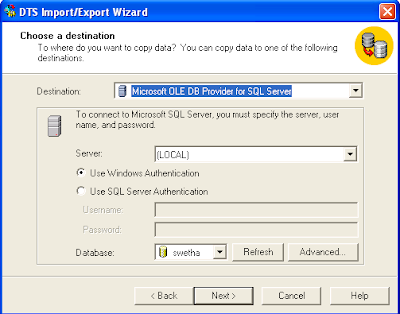
Step 5: Select the database using check box which is provided and click Next.
Note: This process will automatically create a new table if the table does not exists.

Step 6: A screen appears like below. Click Next.

Step 7: Check Run immediately (default). Click Next.

Step 8: An alert is given after succesfully copying the data. Click OK.

Step 9: Click Done

Step 10: Click Finish

Tags: Import Data from excel file to MSSQL database, Excel Data to Sql server database, Export Data from sql server to excel file
