A view may be thought of as a virtual table, that is, a table that does not really exist in its own right but is instead derived from one or more underlying base table. In other words, there is no stored file that direct represents the view instead a definition of view is stored in data dictionary.
Growth and restructuring of base tables is not reflected in views. Thus the view can insulate users from the effects of restructuring and growth in the database. Hence accounts for logical data independence.
Syntax
CREATE VIEW [<> . ] view_name [ ( column [ ,...n ] ) ] [ WITH <> [ ,...n ] ] AS select_statement [ WITH CHECK OPTION ]
<> ::= { ENCRYPTION SCHEMABINDING VIEW_METADATA }
Note: Column is for statements, which contain aggregate functions
Encryption: Code View is encrypted by using this.
Schemabinding: The view is binded with the underlying table structure. Suppose you drop a column of the base table, normally the view gives an error that there is no such column name But if you specify With Schemabinding, then we will not be able to drop the column as it is being accessed by other objects.
View_MetaData: Returns the meta data information about the view.
Check Option: Suppose we create a view with a query, which has where condition. For this view, if the user tries to insert the data that does not match the query then its of no use as that is not shown in the result. So that means, we should give access only to insert records which meets the query criteria. Hence WITH CHECK OPTION is used. The result would be an error for the situation above.
A CREATE VIEW statement cannot:
Include ORDER BY clause, unless there is also a TOP clause (remember that a view is nothing else but a virtual table, why would we want to order it?)
Include the INTO keyword.
Include COMPUTE or COMPUTE BY clauses.
Reference a temporary table or a table variable.
Select statement can use multiple SELECT statements separated by UNION or UNION ALL.
Restrictions for updating data:
A view cannot modify more than one table. So if a view is based on two or more tables, and you try to run a DELETE statement, it will fail. If you run an UPDATE or INSERT statement, all columns referenced in the statement must belong to the same table.
It’s not possible to update, insert or delete data in a view with a DISTINCT clause.
You cannot update, insert or delete data in a view that is using GROUP BY.
It’s not possible to update, insert or delete data in a view that contains calculated columns.
Types:
Indexed Views: Indexed views work best for queries that aggregate or compute columns in the table. The disadvantage of indexed views is that it will slow down a query that updates data in the underlying tables.
Partitioned Views: When you need to write a join query with tables that are in different databases, then we use partitioned views.
Tags: Database Views, SQL Views, MSSQL Views, SQL Server Views, Syntax of Database Views, Types of Views, Types of database views
Monday, May 5, 2008

Database Joins| SQL Joins| Types of database Joins
Join actually puts data from two or more tables into a single result set.
Types:
Inner join or Equi join
Outer Join
Left outer Join
Right Outer Join
Full Outer Join
Cross Join
Self Join
Inner Join: An inner join returns all rows that result in a match.
Example: SELECT Employees.Name, Orders.ProductFROM EmployeesINNER JOIN OrdersON Employees.Employee_ID=Orders.Employee_ID
Left Outer Join: A Left join returns all rows of the left of the conditional even if there is no right column to match.
Example:SELECT Employees.Name, Orders.ProductFROM EmployeesLEFT JOIN OrdersON Employees.Employee_ID=Orders.Employee_ID
Right Outer Join: A right join will display rows on the right side of the conditional that may or may not have a match.
Example:SELECT Employees.Name, Orders.ProductFROM EmployeesRIGHT JOIN OrdersON Employees.Employee_ID=Orders.Employee_ID
Full Outer Join: Returns all the left, right (unmatched rows) and also matched rows.
Cross-Join: A cross join (or Cartesian Product join) will return a result table where each row from the first table is combined with each row from the second table. The number of rows in the result table is the product of the number of rows in each table.
Self-Join: A self-join is a query in which a table is joined (compared) to itself. Self-joins are used to compare values in a column with other values in the same column in the same table.
Example:
SELECT DISTINCT c1.ContactName, c1.Address, c1.City, c1.Region
FROM Customers AS c1, Customers AS c2
WHERE c1.Region = c2.Region
AND c1.ContactName <> c2.ContactName
ORDER BY c1.Region, c1.ContactName;
Tags: Database Joins, Sql joins, Inner join, Equi join, Outer Join, Left outer Join, Right Outer Join, Full Outer Join, Cross Join, Self Join, Types of Database Joins
Types:
Inner join or Equi join
Outer Join
Left outer Join
Right Outer Join
Full Outer Join
Cross Join
Self Join
Inner Join: An inner join returns all rows that result in a match.
Example: SELECT Employees.Name, Orders.ProductFROM EmployeesINNER JOIN OrdersON Employees.Employee_ID=Orders.Employee_ID
Left Outer Join: A Left join returns all rows of the left of the conditional even if there is no right column to match.
Example:SELECT Employees.Name, Orders.ProductFROM EmployeesLEFT JOIN OrdersON Employees.Employee_ID=Orders.Employee_ID
Right Outer Join: A right join will display rows on the right side of the conditional that may or may not have a match.
Example:SELECT Employees.Name, Orders.ProductFROM EmployeesRIGHT JOIN OrdersON Employees.Employee_ID=Orders.Employee_ID
Full Outer Join: Returns all the left, right (unmatched rows) and also matched rows.
Cross-Join: A cross join (or Cartesian Product join) will return a result table where each row from the first table is combined with each row from the second table. The number of rows in the result table is the product of the number of rows in each table.
Self-Join: A self-join is a query in which a table is joined (compared) to itself. Self-joins are used to compare values in a column with other values in the same column in the same table.
Example:
SELECT DISTINCT c1.ContactName, c1.Address, c1.City, c1.Region
FROM Customers AS c1, Customers AS c2
WHERE c1.Region = c2.Region
AND c1.ContactName <> c2.ContactName
ORDER BY c1.Region, c1.ContactName;
Tags: Database Joins, Sql joins, Inner join, Equi join, Outer Join, Left outer Join, Right Outer Join, Full Outer Join, Cross Join, Self Join, Types of Database Joins
Database Normalization| SQL Normalization
Normalization is the process of efficiently organizing data in a database.
Goals: eliminating redundant data (for example, storing the same data in more than one table) ensuring data dependencies make sense (only storing related data in a table)
Levels: 1 NF, 2NF, 3NF, BCNF (Boyce-Codd Normal Form), 4NF, 5 NF
1 NF: Eliminate duplicative columns from the same table. Create separate tables for each group of related data and identify each row with a unique column or set of columns (the primary key).
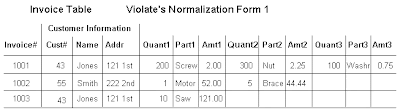
2 NF: Meet all the requirements of the first normal form. Remove subsets of data that apply to multiple rows of a table and place them in separate tables. Create relationships between these new tables and their predecessors through the use of foreign keys.
Goals: eliminating redundant data (for example, storing the same data in more than one table) ensuring data dependencies make sense (only storing related data in a table)
Levels: 1 NF, 2NF, 3NF, BCNF (Boyce-Codd Normal Form), 4NF, 5 NF
1 NF: Eliminate duplicative columns from the same table. Create separate tables for each group of related data and identify each row with a unique column or set of columns (the primary key).

2 NF: Meet all the requirements of the first normal form. Remove subsets of data that apply to multiple rows of a table and place them in separate tables. Create relationships between these new tables and their predecessors through the use of foreign keys.

3 NF: Meet all the requirements of the second normal form. Remove columns that are not dependent upon the primary key. Eg: total, average etc which can be calculated in sql query


Boyce-Codd NF:
A relation is in Boyce-Codd Normal Form (BCNF) if every determinant is a candidate key.
OR
Key attribute should not depend on a non key attribute.
Determinant: A determinant in a database table is any attribute that you can use to determine the values assigned to other attribute(s) in the same row.
Examples: Consider a table with the attributes employee_id, first_name, last_name and date_of_birth. In this case, the field employee_id determines the remaining three fields. The name fields do not determine the employee_id because the firm may have more than one employee with the same first and/or last name. Similarly, the DOB field does not determine the employee_id or the name fields because more than one employee may share the same birthday.
Candidate Key: A candidate key is a combination of attributes that can be uniquely used to identify a database record. Each table may have one or more candidate keys. One of these candidate keys is selected as the table primary key.
4 NF:
Meet all the requirements of the third normal form and BCNF.
A relation is in 4NF if it has no more than one multi-valued or multiple dependency.Consider these entities: employees, skills, and languages. An employee can have several skills and know several languages. There are two relationships, one between employees and skills, and one between employees and languages. A table is not in fourth normal form if it represents both relationships. Instead, the relationships should be represented in two tables. If, however, the attributes are interdependent (that is, the employee applies certain languages only to certain skills), the table should not be split.A good strategy when designing a database is to arrange all data in tables that are in fourth normal form, and then to decide whether the results give you an acceptable level of performance. If they do not, you can rearrange the data in tables that are in third normal form, and then re assess performance.
5NF:
(join-projection normal form)JPNF
It should be in 4NF.
No multi valued dependency exists.
Subscribe to:
Comments (Atom)